
Every receipt where you expect it. Every export the way you need it.
The bookkeeper’s month at a small carrier is chasing: the receipt that never arrived, the invoice number that was used twice, the fuel miles for a state nobody wrote down. MileBrain records those at the moment they happen so you receive files, not a shoebox.
Updated October 7, 2026
Where the numbers come from
Every figure in MileBrain is entered once, by the person it happens to, at the moment it happens: the driver photographs the fuel receipt at the pump, the owner taps Invoice when the load delivers, the shop’s bill is photographed and read into parts and labour lines. The reports, the exports and the AI answers all read from that one record; nothing is computed twice and nothing is retyped.
You receive CSV files with stable columns, two QuickBooks-ready files for invoices and expenses, receipts attached to the entries they belong to, and an IFTA fuel table per jurisdiction, all exported by the owner at any time.
Invoices that cannot collide
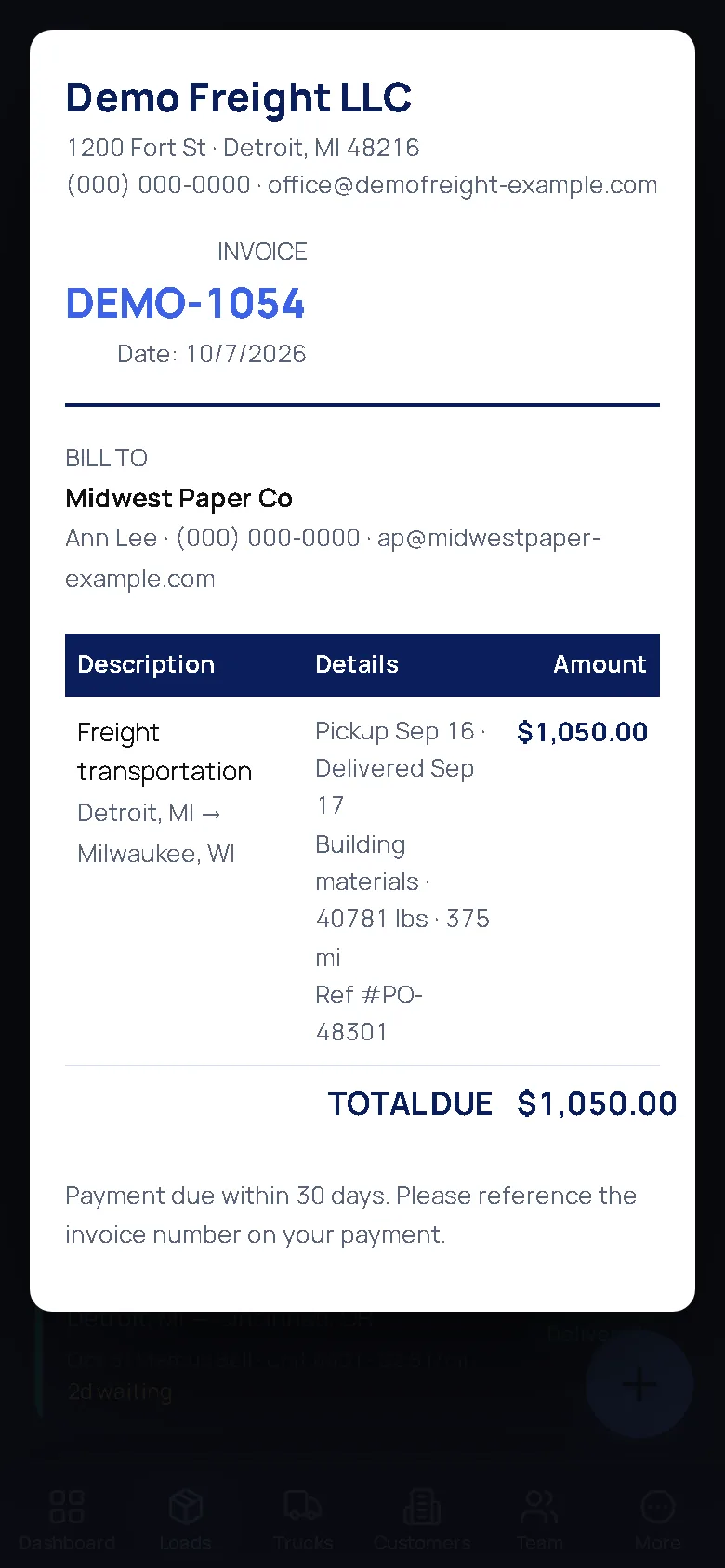
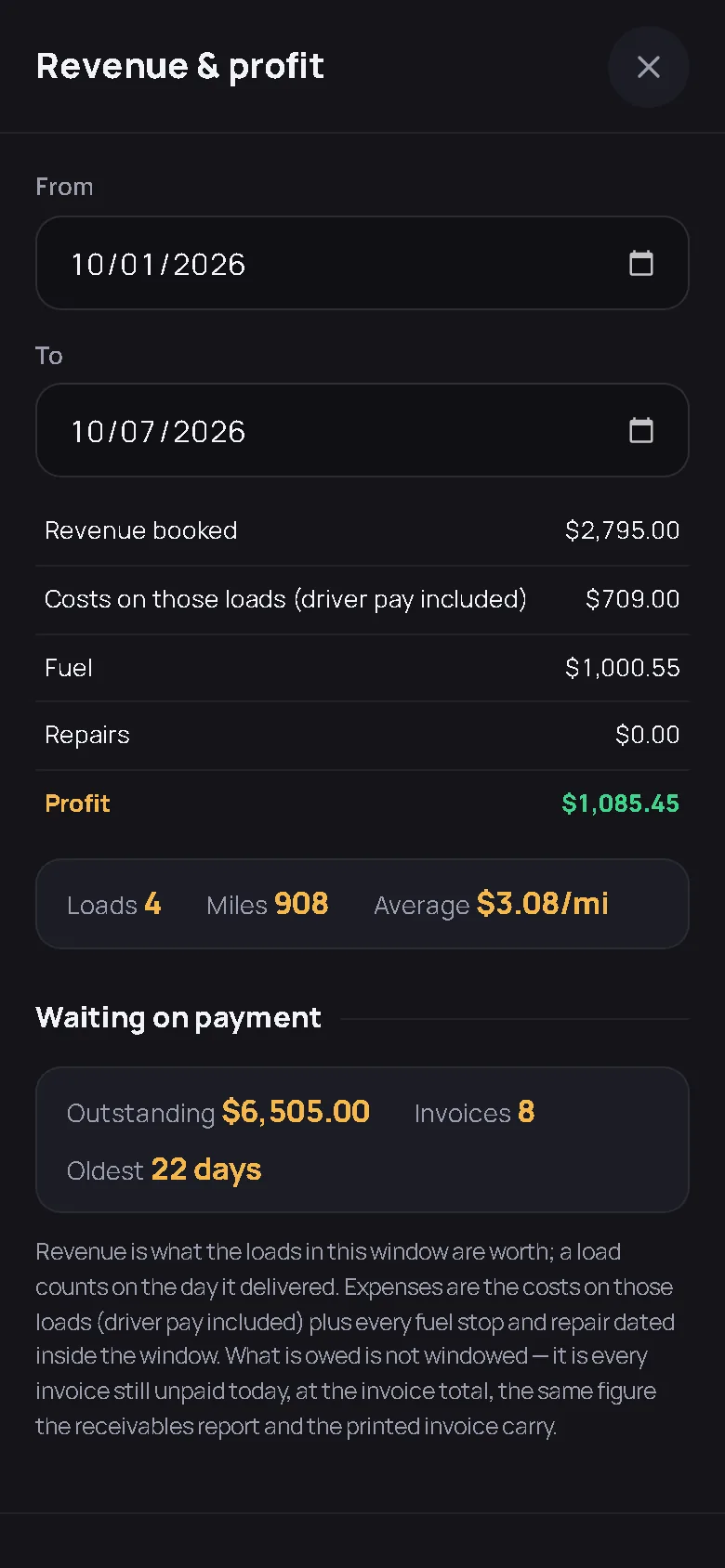
Invoices are auto-numbered from the load, so a number is never used twice and never skipped by hand. Each one carries the customer, the lane, the dates, the reference number, the amount and the signature if one was taken, and it is marked paid either by the owner or by accepting the matching line from an imported bank statement, on the date the money arrived. The receivables figure on the dashboard, the printed invoice and the AI answer to “who owes me money?” are one figure.
Expenses with the paper attached
A fuel receipt gives gallons, price per gallon, total, date, the station and the state; if the gallons times the price do not come to the total, MileBrain keeps the total and flags which two numbers to check. A repair bill gives the shop, its invoice number, the odometer, the total and every priced line split into parts and labour, with anything unclear left unsorted rather than guessed. The original stays attached as a photo or PDF, and a work order closed in the shop writes the repair records the rest of the app reads.
Bank and fuel-card statements
The owner uploads the CSV or OFX from the bank and each line is matched to an invoice, a fuel stop, a repair or a settlement already in the books, as matched, probable or unmatched; accepting a payment marks the invoice paid on that date. The fuel-card statement becomes draft fuel stops, with a stop already typed by hand flagged rather than doubled. Nothing is booked until a person accepts it, and the same line never books twice.
Payroll and settlements
Driver settlements are built from the loads: pay per mile, per load or per hour, reimbursements, deductions, net, and a statement per driver. Timecards come from one-tap clock-ons or the driver’s own stop stamps with overtime past 40 hours, and the payroll export is a CSV with gross from the settlement engine. MileBrain does not file payroll taxes or run payroll; it hands you the numbers.
IFTA and the quarter
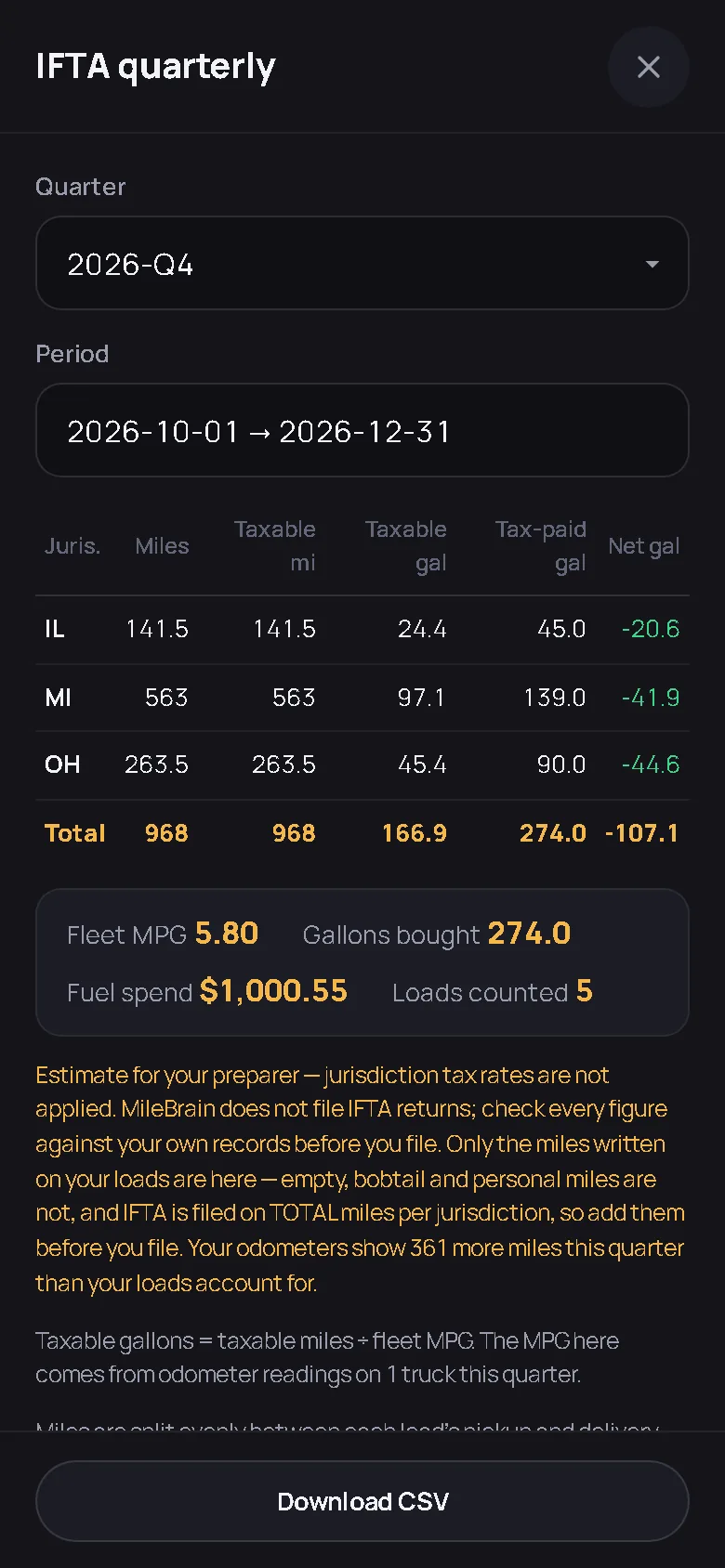
Fuel stops are logged with their state, so the quarterly IFTA fuel table is already built per jurisdiction: miles, taxable miles, taxable gallons, tax-paid gallons and net gallons, with fleet MPG from the odometer readings. MileBrain does not apply jurisdiction tax rates or file the return; it tells you how many odometer miles the loads do not account for so the empty and personal miles get added before filing. The IFTA deadlines guide has the 2026 dates.
Getting the files
Under More the owner exports Loads, Fuel, Repairs, Team and Settlements as CSV, plus Invoices and Expenses in the column layout QuickBooks expects; the files are uploaded to QuickBooks by hand, so nothing syncs behind anyone’s back and nothing can be posted twice. A one-file backup of the whole company can be downloaded at any time, and the public API with a read-only key reads the same records for your own tooling. Ask the owner for an admin login if you want to pull the reports yourself; what you can see is set by the role on the server.
The screens behind the exports
Captured from the live demo company, not drawn. Open the demo and tap through the same screens.
Straight answers
Does MileBrain connect to QuickBooks directly?
No, on purpose. It exports two CSV files, invoices and expenses, in the column layout QuickBooks expects, and you upload them yourself. There is no account to connect and nothing syncing in the background, so nothing can be posted twice without a person doing it.
Are receipts kept with the entries?
Yes. A photographed fuel receipt or repair bill is read into the entry and the original stays attached as a photo or PDF. Repair history lives with the truck, fuel stops with the truck and the driver, and the invoice with the load and the customer.
Can I log in myself to pull reports?
If the owner gives you a login. Company roles are enforced on the server; an admin role can open the reports, the report builder and the exports. The owner can also create a read-only API key for your own tooling and revoke it at any time.
Files, not a shoebox.
Send the owner the link. The exports are on the free plan too.
Start free — no card needed Try the live demoFree for your first truck · No contract · Nothing to install